
The weekly view is where you will spend almost all your time. It shows one week, with your days across the top and your periods down the side.
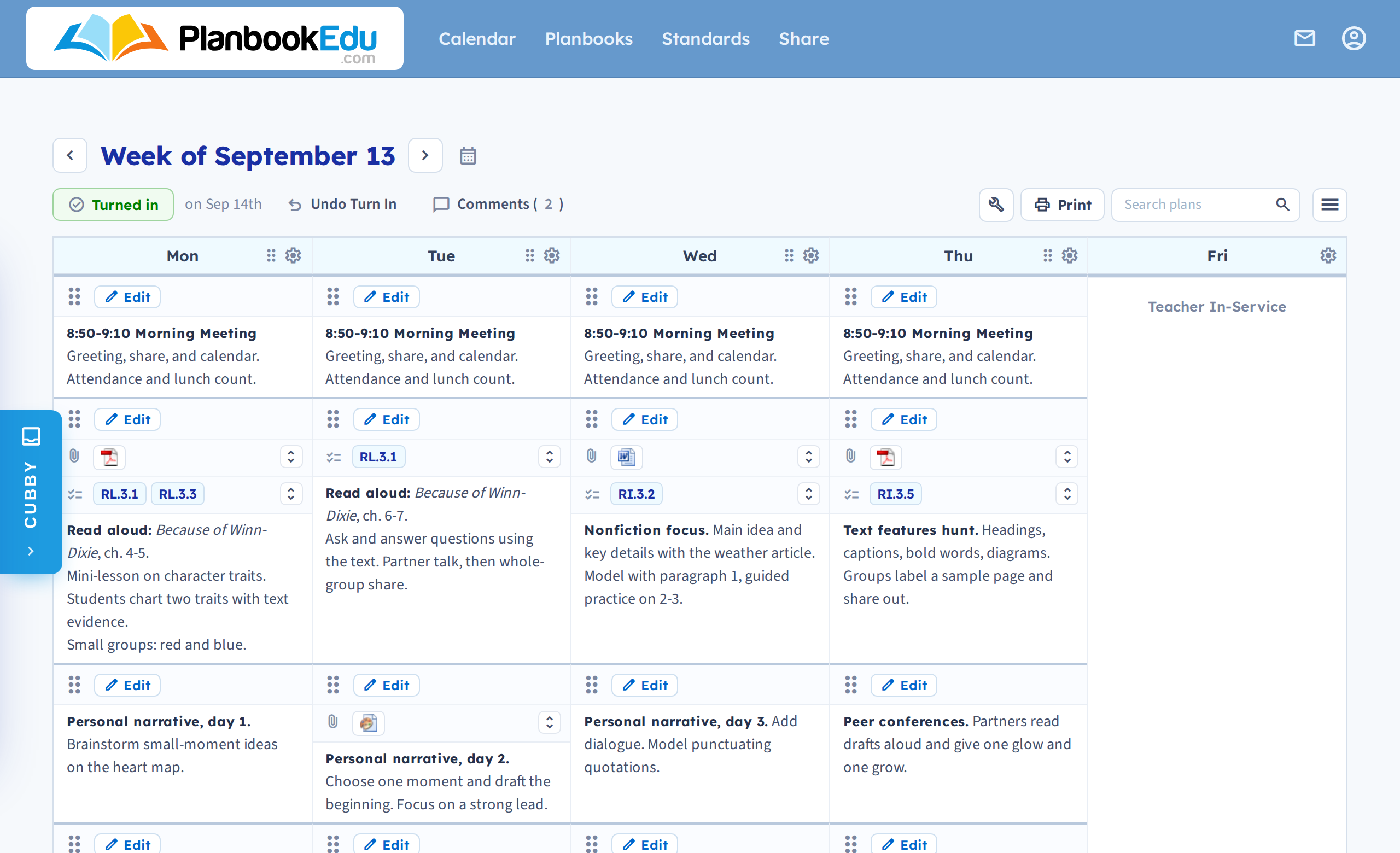
The grid
Each box is one period on one day. Click Edit in any box to write or change that plan, or double-click inside the box to type without leaving the week.
The column on the left holds your period names. If you do not see it, period titles are switched off for this planbook — you can turn them on in the planbook's settings.
Moving between weeks
The arrow next to the week heading moves you forward a week. Use the calendar icon to jump to any date instead of clicking through week by week.
The toolbar
Above the grid:
- Turn In — submit this week's plans to your administrator, if your school uses that feature.
- Comments — feedback an administrator has left on this week.
- Print — a clean printout with none of the browser or app furniture.
- Search plans — find any entry anywhere in the planbook by word.
The top navigation
- Calendar — the month and year views.
- Planbooks — switch between planbooks, or create a new one.
- Standards — which standards you've covered so far.
- Share — give someone else access to your plans.
On the right is your account button. Click it for a menu holding Account settings — your subscription, email address and editor preferences.
If you have more than one planbook, PlanbookEdu opens the one you used last.
Next: Write your first lesson plan.