
You can keep several planbooks running at the same time — one per prep, per subject, per child if you homeschool, or one per school if you split your week.
Multiple simultaneous planbooks are a Premium feature. See Free vs. Premium.
The Planbooks list
Click Planbooks in the navigation bar to see everything you have.
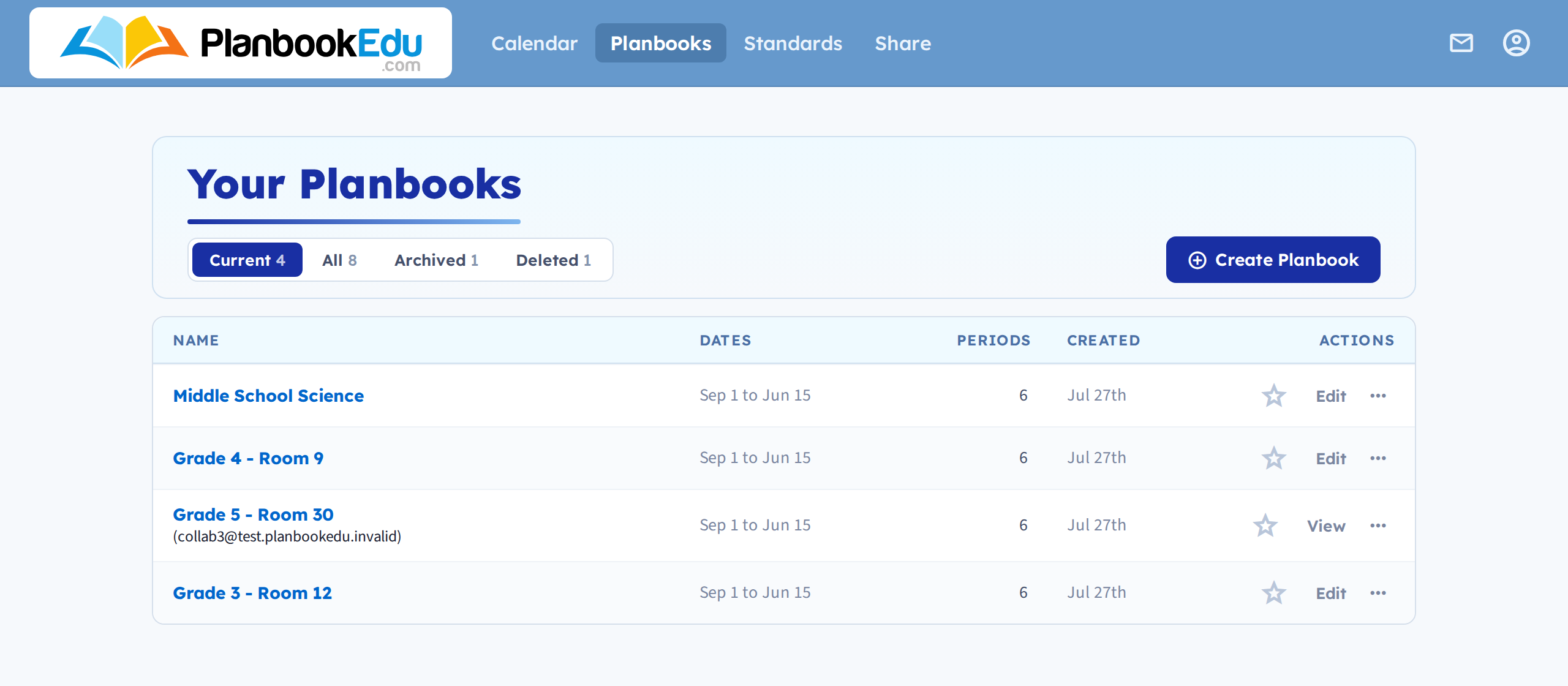
Tabs across the top split the list into Current, All, Archived and Deleted, each with a count. Current is the default, so a planbook you've archived is one tab away rather than gone.

For each planbook:
- the planbook name — open it and start planning
- Edit — change basic and advanced settings
- More — a menu holding Standards, Reorder Periods, Collaborate, Off Days, Export, Archive, Google Calendar and Remove
Switching planbooks is just clicking a different name.
Name them so you can tell them apart
This is the one thing worth doing carefully. "My Planbook" and "My Planbook (2)" are indistinguishable in a list six months later. Include the class and the year: "Grade 4 — Mrs. H — 2026-27", "Period 3 Biology".
Keeping the list manageable
Archive planbooks from finished years. They stay readable but drop off the main list, so what you see is what you're currently teaching.
About the planbook limit
If you see a message about reaching a planbook limit, you don't need to delete anything.
The limit exists because accounts were being shared between multiple teachers, not to restrict legitimate use. Plenty of people genuinely need many planbooks — homeschool parents with one per child, teachers covering several subjects or schools.
Contact support and confirm the planbooks in the account are yours. We'll review it and raise the limit.